
When I started my CAD journey I never thought that I would live in an era where AI will solve the problem of 3D modeling. AI is a fascinating and rapidly evolving area not only in Information technology but also in Mechanical Engineering. I am talking about a new wave of AI model that MIT engineers are looking to bridge the gap between a simple sketch and a fully realized 3D CAD model. this AI model will follow the human CAD modeling approach which is creating a sketch and then converting it into 3D model.
What is Special About MIT Engineers AI Model for CAD-:
MIT engineers take a totally different approach to solve the problem. Instead of trying to generate a 3D shape directly, it learns to use CAD software in the same way a Mechanical CAD engineer does by reading drawing then creating sketch and converting it into a 3D model.
MIT Engineers AI Model for CAD learns by watching and replicating the exact sequence of mouse clicks, menu selections, and keyboard commands for creating 3D model as CAD engineer does in day to day task. This innovative method can revolutionized for CAD modeling process and it will save lots of time for design engineers & companies that provides CAD services. paper presented at the NeurIPS conference in December 2025, aims to create a true “CAD co-pilot” that can collaborate with designers rather than just automate a final output.
🎯 The Core Innovation: Learning by Observation-:
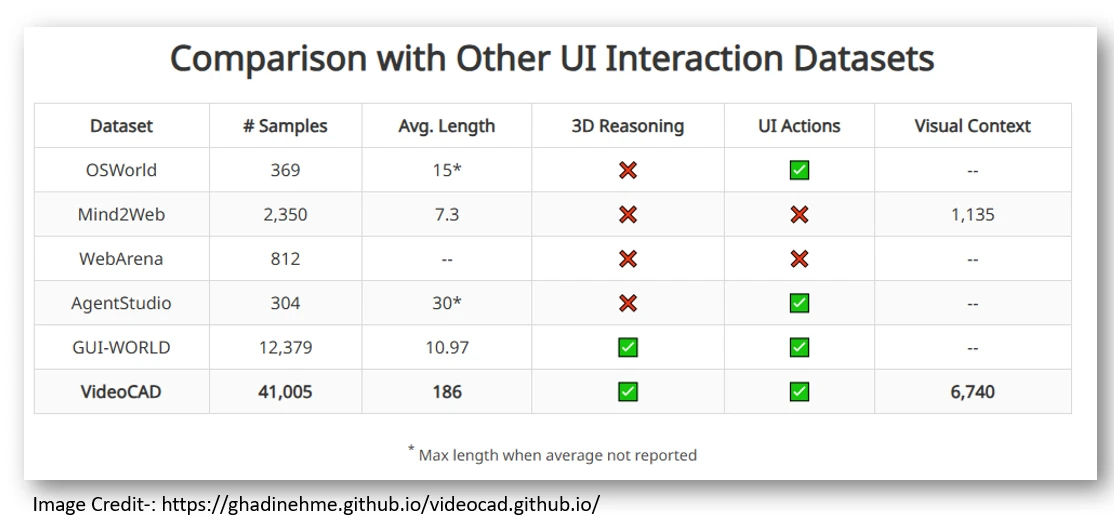
The core of this breakthrough is a new, massive dataset created by the MIT team, called VideoCAD. Unlike previous datasets that only recorded high-level commands (like “extrude this face”), VideoCAD captures the entire, step-by-step user-interface (UI) journey of a CAD engineer while modeling a part. if this works well with upcoming future development then this could be a new intern for CAD services companies.
| Feature | What it is | Why it is Special |
|---|---|---|
| The VideoCAD Dataset | Over 41,000 videos of CAD construction sequences in the browser-based software, Onshape. | It is not just a list of commands. It logs every low-level UI action: precise mouse clicks, drags, scrolls, keystrokes, and tool selections, all time-stamped and aligned with the on-screen video. |
| Training the AI | MIT Engineer used VideoCAD to train a transformer model called VideoCADFormer. | The AI learns to predict the next UI action—down to the exact pixel coordinate for a click—required to build a 3D model from a 2D sketch. It learns the process, not just the final geometry. |
🖱️ How It’s Different From Human CAD Modeling-:
The core idea behind VideoCAD is elegantly simple yet powerful: instead of just learning what a final 3D model looks like, it learns how to build it by watching and mimicking the precise mouse clicks, keyboard shortcuts, and menu selections a human designer makes.
Conventional AI Design: In general Most AI models in this space try to generate a final 3D geometry (like a mesh or a STEP file) directly from an input and this input may be a text command and it creates a finished shape, but final output often a “black box” that is difficult to edit or integrate into existing professional workflows.
MIT’s Human-like Approach: This AI agent acts like a virtual intern. Given a 2D sketch, it takes control of the CAD software and builds the model click-by-click, just as a trained engineer would daily at their workplace. For example, to draw a line, it does not just command “draw line.” It executes a sequence: select the line tool, move the cursor to a specific pixel location on the sketch, click, drag to a second pixel location, and click again like a Human CAD engineer does.
👀 How It Learns by Watching-:
The team created an enormous dataset, also named VideoCAD, containing over 41,000 videos of CAD modeling sessions-1-3. This isn’t just screen recordings; every single action is timestamped, from moving the mouse to specific pixel coordinates and selecting a tool, to typing in values.
The researchers started with a dataset of existing human-made CAD designs that included high-level commands like “sketch line” or “extrude”. The key breakthrough was translating these abstract commands into the specific, low-level user-interface (UI) actions needed to execute them in real software.
“For example, let’s say we drew a sketch by drawing a line from point 1 to point 2. We translated those high-level actions to user-interface actions, meaning we say, go from this pixel location, click, and then move to a second pixel location, and click…” — Ghadi Nehme, MIT Graduate Student.
⚙️ Putting the AI to Work-:
Equipped with this dataset, the team trained an AI model called VideoCADFormer, an autoregressive transformer designed to predict the next UI action based on the current screen and the target model it’s trying to build.
The results are promising. When given a 2D sketch, the AI can now directly control the CAD software—clicking, dragging, and selecting tools to construct a 3D shape. The model demonstrated impressive technical performance, achieving a 98% command accuracy and 82.35% parameter accuracy in tests.
However, the road to a perfect “push-button CAD” system is long. The researchers found that because the tasks can involve sequences of up to 186 actions (over 20 times longer than typical UI datasets), tiny errors—like a mouse cursor being slightly off-target—can compound and cause a model to fail.
🤝 The Goal: A True “CAD Co-pilot”-:
This innovation, led by MIT graduate student Ghadi Nehme and MIT Professor Faez Ahmed, aren’t just automating design they want to give it human touch.

- Lowering the Barrier:This AI model can handle complex UI, the AI could make professional CAD tools accessible to beginners, hobbyists, and inventors who lack years of training.
- Boosting Productivity for Experts: For seasoned engineers, this “CAD co-pilot” could automate tedious and repetitive tasks like adding filets, adding chamfer, creating standard features like extrude or cut, or preparing a model for 3D printing (STL file).
- Validation from Industry: Mehdi Ataei, a senior research scientist at Autodesk Research, called VideoCAD “a valuable first step toward AI assistants that help onboard new users and automate the repetitive modeling work that follows familiar patterns”.
🔭 Current Capabilities and the Road Ahead-:
The current model is a powerful proof-of-concept. It has successfully generated 3D models ranging from simple brackets to more complex house layouts by working in the Onshape environment and here I want to share one thing that I also started teaching Onshape on My Mechnexus YouTube Channel and I think Onshape have lot’s of potential as CAD solution for Cloud environment. On benchmarks, AI model achieved impressive command prediction accuracy, though the researchers note that tiny errors in predicting a mouse-click coordinate that can be not be major issue because we can not get perfect product initial stage. it will improve with AI’s own learning capability.
The MIT team is already looking ahead. Future work will involve training the model on more complex shapes, expanding to include advanced CAD features like fillets, lofts, and assemblies, and potentially adapting it to work across multiple CAD platforms, including FreeCAD which is free and open-source.
This research excited me because it moves beyond simple automation toward a future where AI works alongside human creativity, deeply integrated into the very tools that engineers and designers use every day in their professional life. I am offering my mechanical CAD service on Fiverr with FreeCAD a tool like this could eventually become a powerful assistant, helping to quickly generate model variants or prepare files to show my client so that they can go ahead for manufacturing, allowing me to focus on the more complex and creative aspects of design.
“Thank you for reading! If you found this article insightful and valuable, consider sharing it with your friends and followers on social media. Your share can help others discover this content too. Let’s spread knowledge together. Your support is greatly appreciated!”