Hello friends welcome to Onshape Part Modeling tutorial. In this tutorial we will Model Frame Guide in Onshape from scratch.


Select the front plane and create below sketch. As shown in image.

Now Extrude the sketch profile to the distance of 48mm and keep it symmetric As shown in below image.
 Now select the back face and create slot like profile As shown in below image.
 Now remove the material to the distance of 11mm As shown in below image.
 Now select the edge and give fillet of 6mm As shownin below image.
 Now select the edge and give fillet of 13mm As show in below image.
 Now select the top face and create two circle which should be concentric to the fillet arc and with the help of hole wizard tool create 10mmm plain drill hole As shown in below image.
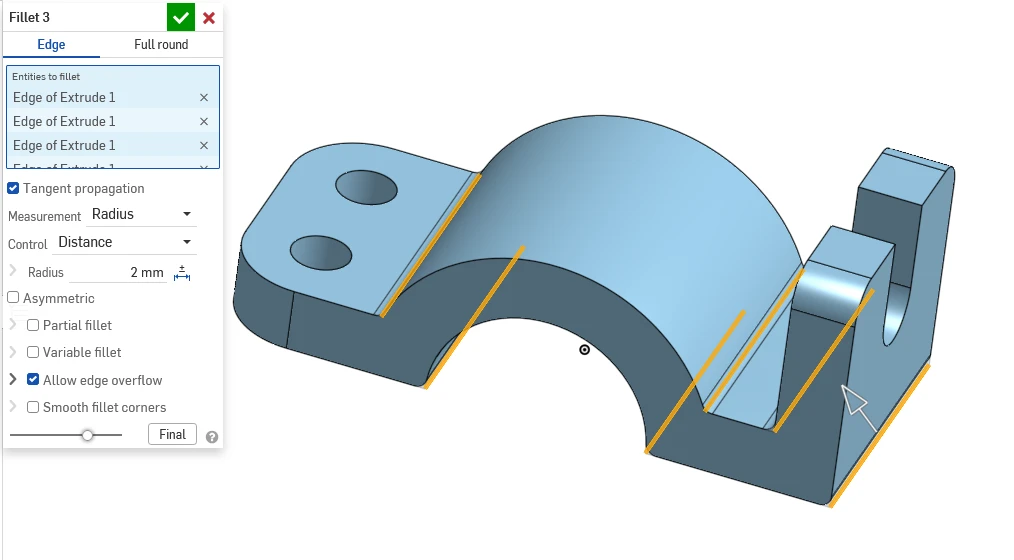
 Now select highlighted edge in image and give common fillet of 2mm As shown in below image.
 Now select the top plane and at center create circle of 5mm
 create through all hole as shown in image.

“Thank you for reading! If you found this article insightful and valuable, consider sharing it with your friends and followers on social media. Your share can help others discover this content too. Let’s spread knowledge together. Your support is greatly appreciated!”
