FreeCAD offers a wealth of learning materials, ranging from the official documentation wiki to community-driven video tutorials and comprehensive books. Here is a brief overview to help you navigate the available resources and find the best path for your learning style and goals.
Also Read-:
- Advantages of FreeCAD Over Other CAD Tool
- How to Clone and Rotate Body in FreeCAD
- Free Online Tool to View CAD Files
The table below summarizes the main types of resources to help you get started.
| Resource Type | Examples | Format | Best For | Notes |
|---|---|---|---|---|
| Official Documentation | FreeCAD Wiki, Tutorials page | Written guides, reference | In-depth understanding, specific tool lookups | The most authoritative source; community-maintained; includes version-specific tutorials. |
| Books | “FreeCAD 1.0.2 User Guide” | Comprehensive written guide | Structured learning, reference | Commercial books offer structured curricula; ensure they cover your FreeCAD version. |
| Video Tutorial Series | DigiKey’s 10-part Intro series, YouTube | Video | Visual learners, step-by-step project walkthroughs | Often project-based; DigiKey series uses v0.22/v1.0RC1 and includes accompanying files. |
| Workbench-Specific Written Tutorials | Basic Part Design Tutorial, Sketcher Lecture, CAM tutorial | Written guides with images | Mastering specific workbenches (PartDesign, Sketcher, CAM, FEM, etc.) | Available on the FreeCAD Wiki; range from beginner to advanced. |
| Community & Forums | FreeCAD Forum, Discord, Reddit | Discussion boards, chat | Getting help, troubleshooting, sharing work | Ideal for asking specific questions when stuck on a tutorial or project. |
| Project-Based Learning | Raspberry Pi tutorials, DigiKey SD card holder | Step-by-step project guides | Learning by building practical objects | Great for staying motivated; teaches workflow, not just isolated tools. |
📚 A Closer Look at Key Resources-:
-
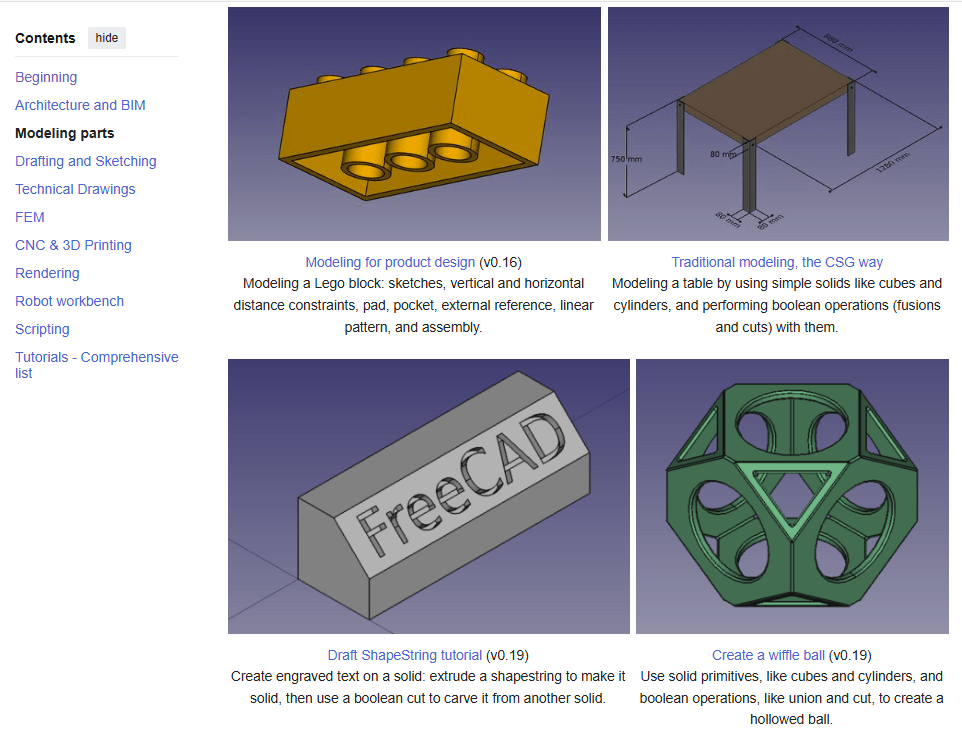
The Official FreeCAD Wiki: The central hub for documentation is the FreeCAD wiki, and its Tutorials page is your best starting point. It offers a curated selection of high-quality written tutorials organized by topic, such as Architecture and BIM, Modeling parts, Drafting and Sketching, FEM, and CNC & 3D Printing. For absolute beginners, the Basic Part Design Tutorial is an essential read to understand the parametric modeling workflow. Always check the FreeCAD version noted in the tutorial, as tools may have changed.
-
Structured Video Courses: For those who prefer watching over reading, the DigiKey 10-part “Introduction to FreeCAD” series is an excellent modern resource. Created with FreeCAD v0.22/v1.0RC1, it addresses the topological naming problem and guides you through practical projects like designing an SD card holder, from sketch to 3D print. The series includes both videos and written guides with downloadable files.
-
Project-Based and Community Tutorials: Learning by doing is highly effective. The Raspberry Pi project offers simple, beginner-friendly tutorials for modeling objects like a die, a headphone tidy, or a chess set. For more specialized guidance, the wiki provides tutorials for specific workbenches, such as creating a 2D floor plan with the Draft workbench or preparing a model for CNC machining with the CAM workbench. When you inevitably get stuck, the FreeCAD Forum is an invaluable resource for asking questions and finding solutions.
Also Read-:
- Setup Auto Spacing in FreeCAD Sketcher
- Insert Surface Finish Symbol in FreeCAD Drawing
- Visit My FreeCAD Video Tutorial Library
💡 Tips for Your Learning Journey-:
-
Start with the official tutorials: They are designed to introduce you to the core philosophy of parametric design, which is crucial for building stable, editable models.
-
Follow along with a project: Pick a tutorial for a simple object you’d like to create, like the SD card holder, and build it step-by-step.
-
Don’t hesitate to use multiple resource types: You might watch a video to understand a concept, then refer to a written tutorial for the exact steps, and finally ask a question on the forum to clarify a specific issue.
-
Pay attention to software versions: FreeCAD is actively developed. Using a tutorial for an older version (e.g., v0.16 or v0.17) can be confusing, as the interface and tools may have changed significantly. Look for resources that mention v0.19, v0.20, or newer.
With this combination of official documentation, structured video series, and hands-on projects, you’ll find a learning path that suits your style. Given your interest in offering Mechanical CAD services, focusing on the PartDesign, Sketcher, and TechDraw tutorials will build a strong foundation for creating manufacturing-ready models.
- YouTube Channels:
- Joko Engineeringhelp: https://www.youtube.com/c/JokoEngineeringhelp
- Beginner-friendly FreeCAD tutorials and tips.
- MangoJelly Solutions: https://www.youtube.com/c/MangoJellySolutions
- In-depth FreeCAD tutorials and workflows.
- Brodie Fairhall: https://www.youtube.com/c/BrodieFairhall
- Tutorials focused on 3D printing and design.
- Joko Engineeringhelp: https://www.youtube.com/c/JokoEngineeringhelp
- FreeCAD Academy: https://freecadacademy.com/
- Free and paid tutorials for learning FreeCAD.
- Learn FreeCAD: https://learnfreecad.com/
- Step-by-step tutorials for beginners.
“Thank you for reading! If you found this article insightful and valuable, consider sharing it with your friends and followers on social media. Your share can help others discover this content too. Let’s spread knowledge together. Your support is greatly appreciated!”