FreeCAD part design tools are very similar to SolidWorks you can do almost anything with FreeCAD part design Workbench that you can do with SolidWorks or other similar type of CAD tools. In this tutorial we will learn loft and Sweep tool in FreeCAD.
Loft and Sweep are both advanced 3D modeling tools in FreeCAD used to create complex, organic shapes, but they work in fundamentally different ways. Loft creates a smooth transition between multiple cross-sections, while Sweep distributes a profile along a path (called a spine).
🏗️ Loft: Transition Between Profiles-:
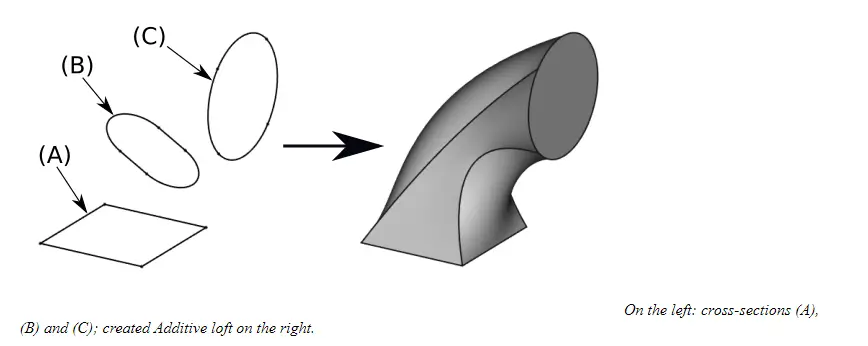
Loft is ideal for creating shapes that morph or blend from one cross-section to another, such as a boat hull or an ergonomic handle. In FreeCAD Loft Feature is known as Additive Loft which create solid inside active body with the help of transition between two or more shapes also known as cross section as shown in below image where a solid created wit the help of three different cross section Square, Slot and Circular section.
-
Core Concept: It takes two or more sketches (cross-sections) and interpolates a solid that connects them.
-
Key Workflow: You create multiple sketches at different positions and orientations, then select them in the order you want the transition to follow. The order of selection is critical because the tool connects them sequentially.
-
Important Options:
-
Ruled Surface: When unchecked (default), the transition is smooth and curved. When checked, it creates straight, flat transitions between sections.
-
Closed: Connects the last section back to the first to create a looped shape.
-
-
Tips for Success: For the best results, it is recommended to use the same number of segments in all cross-sections. For example, if lofting between a rectangle and a circle, break the circle into 4 arcs so both profiles have 4 segments.
🌀 Sweep: Profile Along a Path-:
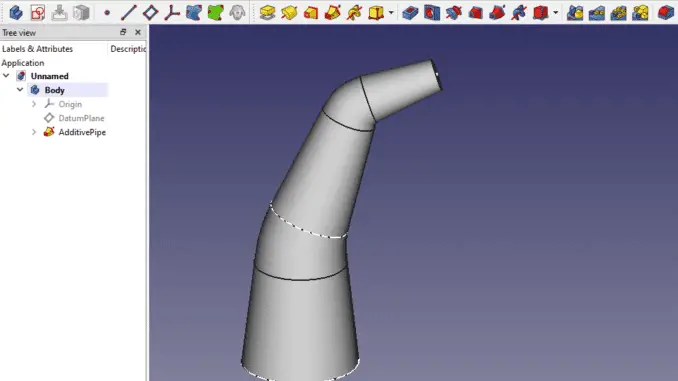
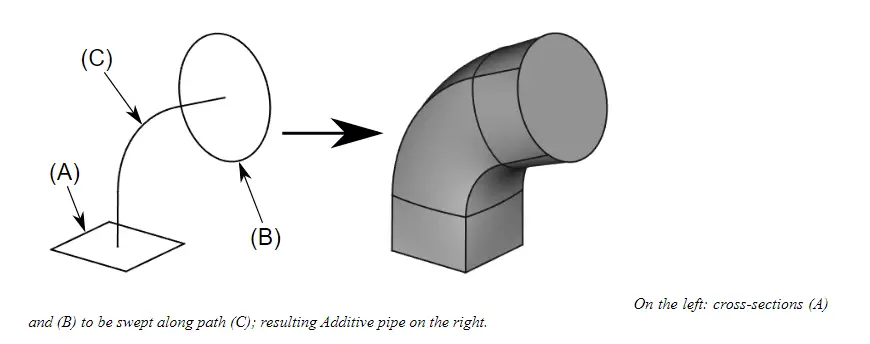
Sweep (also called Additive Pipe in Part Design) is used for creating tubes, pipes, or threads. It takes a profile shape and pushes it along a defined path. Sweep tool in FreeCAD known as Additive pipe which is used to create solid inside active body or part with combination of two or more profile with the help of open or closed path as shown in below image where profile A merged with Profile B along the path C.
-
Core Concept: A profile (the cross-section) is moved along a spine (the path) to create a solid.
-
Key Workflow: You need two main sketches: one for the profile (the shape to sweep) and one for the path (the trajectory). Position the profile sketch to intersect the start of the path.
-
Important Options:
-
Frenet: This controls how the profile rotates as it follows the path. If you see the shape twisting strangely (like on a helix), try toggling this option.
-
Orientation Mode: You can keep the profile perpendicular to the path (Standard) or lock its orientation to prevent rotation (Fixed).
-
-
Tips for Success: The profile sketch should typically be mapped to be orthogonal (perpendicular) to the start of the path for the cleanest result.
💡 Key Differences at a Glance-:
| Feature | Loft | Sweep (Pipe) |
|---|---|---|
| Primary Use | Blending shapes (e.g., fuselage to wing) | Creating rails, tubes, threads |
| Inputs | Multiple profiles | 1 profile + 1 path |
| Path Required? | No (implicitly defined by profile order) | Yes (an explicit spine) |
| Positioning | Sketches placed freely in space | Profile must be positioned at path start |
In short, if you are trying to create a shape that changes from a square to a circle, use Loft. If you are trying to create a pipe that follows a curved wire, use Sweep.
“Thank you for reading! If you found this article insightful and valuable, consider sharing it with your friends and followers on social media. Your share can help others discover this content too. Let’s spread knowledge together. Your support is greatly appreciated!”
Watch Video Version of this Tutorial-:
 My FreeCAD Projects,Model & Drawing now on Payhip